2018.7.10
tabBarItem的Badge默认样式是带数字的,但是产品要求只要一个小红点,不需要数字,这就需要我们自定义Badge了。
用Reveal分析UITabBar,发现每个按钮是一个UITabBarButton,层级如下:
-UITabBarButton –UITabBarSwappableImageView // 图标 –UITabBarButtonLabel // 文字
如何从UITabBar中找到对应index的UITabBarButton呢?我们断点调试下,可以看到可以直接从UITabBar中用KVC取出。
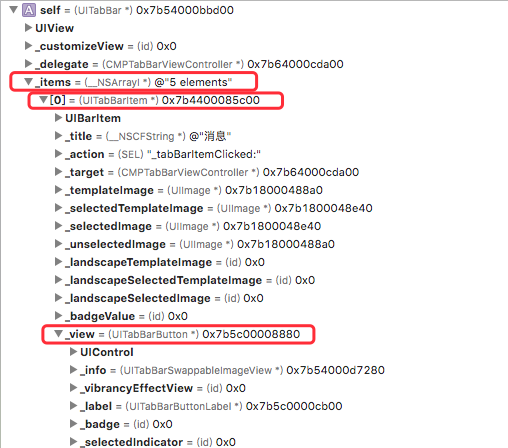
实现方案如下:
- 用KVC找到UITabBarSwappableImageView,关键函数
__iconViewWithIndex - 新建Badge,加到UITabBarSwappableImageView上
- 新建Badge的时候设置Tag,通过Tag来移除Badge
上代码
static NSInteger const kBadgeViewTagBase = 10000;

@implementation UITabBar (badge)

// 显示Badge
- (void)showBadgeOnItemIndex:(int)index {
    if (index >= self.items.count) {
        return;
    }

    // 如果之前添加过,直接设置hidden为NO
    UIView *icon = [self __iconViewWithIndex:index];
    for (UIView *subView in icon.subviews) {
        if (subView.tag == kBadgeViewTagBase) {
            subView.hidden = NO;
            return;
        }
    }

    UIView *badgeView = [[UIView alloc] init];
    badgeView.tag = kBadgeViewTagBase;
    badgeView.layer.cornerRadius = 5;
    badgeView.backgroundColor = [UIColor redColor];
    badgeView.frame = CGRectMake(icon.frame.size.width - 5, 0, 9, 9);
    [icon addSubview:badgeView];
}

// 隐藏Badge
- (void)hideBadgeOnItemIndex:(int)index {
    UIView *icon = [self __iconViewWithIndex:index];
    for (UIView *subView in icon.subviews) {
        if (subView.tag == kBadgeViewTagBase) {
            subView.hidden = YES;
        }
    }
}

// 获取图标所在View
- (UIView *)__iconViewWithIndex:(int)index {
    UITabBarItem *item = self.items[index];
    UIView *tabBarButton = [item valueForKey:@"_view"];
    UIView *icon = [tabBarButton valueForKey:@"_info"];
    return icon;
}

@end