2018.7.23
使用Auto Layout来进行布局就不用自己去监听横竖屏事件了,只需要绘制多套布局即可。但是项目有很多页面是自己手动计算的,于是只有想办法再旋转屏幕时重新布局。
相关枚举#
屏幕方向有3个相关枚举,界面方向UIInterfaceOrientation,设备方向UIDeviceOrientation,支持旋转方向UIInterfaceOrientationMask。
注意UIInterfaceOrientation与UIDeviceOrientation左右方向是相反的
typedef NS_ENUM(NSInteger, UIInterfaceOrientation) {
    UIInterfaceOrientationUnknown            = UIDeviceOrientationUnknown,
    UIInterfaceOrientationPortrait           = UIDeviceOrientationPortrait,
    UIInterfaceOrientationPortraitUpsideDown = UIDeviceOrientationPortraitUpsideDown,
    UIInterfaceOrientationLandscapeLeft      = UIDeviceOrientationLandscapeRight,
    UIInterfaceOrientationLandscapeRight     = UIDeviceOrientationLandscapeLeft
};

typedef NS_OPTIONS(NSUInteger, UIInterfaceOrientationMask) {
    UIInterfaceOrientationMaskPortrait = (1 << UIInterfaceOrientationPortrait),
    UIInterfaceOrientationMaskLandscapeLeft = (1 << UIInterfaceOrientationLandscapeLeft),
    UIInterfaceOrientationMaskLandscapeRight = (1 << UIInterfaceOrientationLandscapeRight),
    UIInterfaceOrientationMaskPortraitUpsideDown = (1 << UIInterfaceOrientationPortraitUpsideDown),
    UIInterfaceOrientationMaskLandscape = (UIInterfaceOrientationMaskLandscapeLeft | UIInterfaceOrientationMaskLandscapeRight),
    UIInterfaceOrientationMaskAll = (UIInterfaceOrientationMaskPortrait | UIInterfaceOrientationMaskLandscapeLeft | UIInterfaceOrientationMaskLandscapeRight | UIInterfaceOrientationMaskPortraitUpsideDown),
    UIInterfaceOrientationMaskAllButUpsideDown = (UIInterfaceOrientationMaskPortrait | UIInterfaceOrientationMaskLandscapeLeft | UIInterfaceOrientationMaskLandscapeRight),
};横竖屏控制#
控制界面横竖屏切换有3个重要的点,最终结果以这三个地方的值取交集。
1.info.plist全局控制
可以在General->Deplyment Info界面上勾选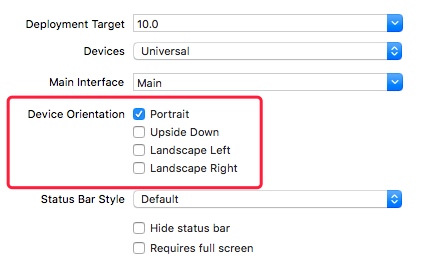
info.plist文件中配置也是一样的,两边会同步变更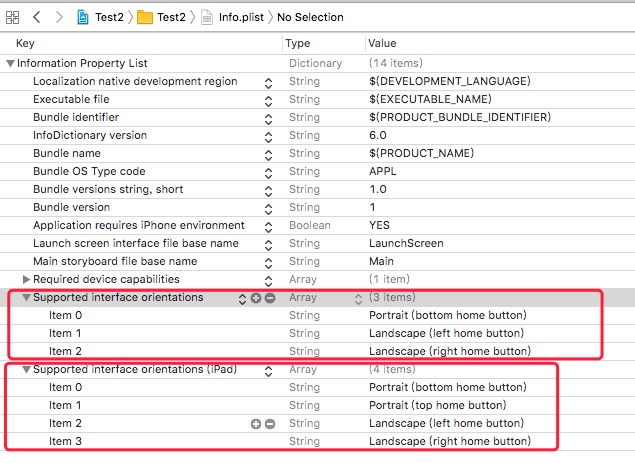
2.AppDelegate中根据不同Window控制
// AppDelegate
- (UIInterfaceOrientationMask)application:(UIApplication *)application supportedInterfaceOrientationsForWindow:(UIWindow *)window {
    return UIInterfaceOrientationMaskLandscapeLeft | UIInterfaceOrientationMaskPortrait;
}
3.在ViewController中控制当前页面
// UIViewController
- (BOOL)shouldAutorotate {
    return YES;
}

- (UIInterfaceOrientationMask)supportedInterfaceOrientations {
    return UIInterfaceOrientationMaskLandscapeLeft;
}
需要注意的是,交集不能为空,否则会导致crash
*** Terminating app due to uncaught exception ‘UIApplicationInvalidInterfaceOrientation’, reason: ‘Supported orientations has no common orientation with the application, and [ViewController shouldAutorotate] is returning YES’

旋转事件监听#
旋转事件传递过程#
op0=>operation: __CFRunLoopDoSources0
op1=>operation: UIDevice
op2=>operation: UIWindow
op3=>operation: UIViewController
op4=>operation: UIView

op1->op2->op3->op4屏幕旋转相关事件#
viewWillTransitionToSize:withTransitionCoordinator:
- ViewController被父容器变更size时调用(例如window旋转时调用root view controller的该方法)
- 如果重载该方法,需要调用super传递事件给子ViewController
- 这个方法是最关键的,可以在该方法中对界面进行重新布局
- (void)viewWillTransitionToSize:(CGSize)size withTransitionCoordinator:(id <UIViewControllerTransitionCoordinator>)coordinator
{
    // coordinator用来处理转换动画
    [coordinator animateAlongsideTransition:^(id<UIViewControllerTransitionCoordinatorContext> context)
     {
         // 开始旋转
     } completion:^(id<UIViewControllerTransitionCoordinatorContext> context)
     {
         // 旋转结束
     }];
     // 记得调用super
    [super viewWillTransitionToSize:size withTransitionCoordinator:coordinator];
}
UIApplicationWillChangeStatusBarOrientationNotification
- 状态栏将要旋转,这个时候取view的frame还是旋转之前的
- NSNotification中用key
UIApplicationStatusBarOrientationUserInfoKey可以取到将要旋转到的方向。
UIApplicationDidChangeStatusBarOrientationNotification
- 状态栏已经旋转,这个时候取view的frame是旋转之后的
- NSNotification中用key
UIApplicationStatusBarOrientationUserInfoKey可以取到旋转之前的方向。
UIDeviceOrientationDidChangeNotification
- 设备方向变更,在收到通知时取view的frame是旋转之后的。
- 在手机上将旋转屏幕锁定之后,设备方向变更之后收不到该通知
- 在代码里面限制设备旋转方向,设备方向变更后依然能收到该通知
调用顺序如下
st=>start: 旋转屏幕
e=>end: 结束
op1=>operation: viewWillTransitionToSize:withTransitionCoordinator:
op2=>operation: UIApplicationWillChangeStatusBarOrientationNotification
op3=>operation: UIApplicationDidChangeStatusBarOrientationNotification
op4=>operation: viewWillLayoutSubviews
op5=>operation: viewDidLayoutSubviews
op6=>operation: UIDeviceOrientationDidChangeNotification

st->op1->op2->op3->op4->op5->op6->e自定义Window的旋转事件#
如果想要在自定义Window的子View收到屏幕旋转通知,要设置UIWindow的rootViewController,然后把所有子view都加到rootViewController,系统会处理横竖屏事件。这里我还遇到一个坑记一个实现UIWindow子类的小坑。
推荐阅读#
https://satanwoo.github.io/2016/09/17/uiwindow-iOS/ iOS屏幕旋转知识点以及实现 iOS 屏幕旋转的那些事(一) 浅谈iOS的多Window处理